macOS · Apple Silicon AI on-device Working MVP · pre-launch

Edit video. Run AI. Stay offline.

A desktop video editor whose AI runs entirely on the creator’s own Mac: subtitles, voiceover, auto-editing and generation. No cloud, no accounts, no credits.

Packaged app v0.1.0 Full workflow tested offline Pre-revenue

Kadr Studio editor with an AI-generated coastline in the preview, the title "COASTLINE" and a Whisper caption, a media library of AI-generated stills, the project inspector, and a five-track timeline of titles, captions, video, voiceover and music. The top bar has the 16:9 / 9:16 / 1:1 switch, the LOCAL / OFFLINE indicator and an interface language picker set to English.
Real app screenshot demo made with its own local AI

Network log · 0 requests

The LOCAL / OFFLINE dialog: all AI models run on this computer, no cloud AI APIs or accounts, no telemetry, media never leaves the computer, AI processes talk over local pipes with no network ports, the interface cannot reach the network; 0 blocked network requests and a network log reading "No network access so far."

Creators want AI in the edit. Today it lives on someone else’s servers.

Auto-captions, voiceover and silence cuts are now expected. In most editors they mean an upload, a sign-in and a credit balance.

  1. AI editing features are cloud-gated.

    In mainstream consumer editors, auto-captions, voiceover, translation and generation run on the vendor’s servers. They need a login, an upload and paid credits or a subscription.

  2. Uploading raw footage is a privacy and rights problem.

    Unreleased client work, interviews, medical or legal footage, minors and internal corporate video often cannot leave the device. Agencies, journalists, educators and companies are bound by NDAs and data rules.

  3. Cloud AI is slow and fragile for video.

    Multi-gigabyte uploads, queues and outages hurt on weak or metered connections, and nothing works offline: travel, on set, field work.

  4. Pro tools are not AI-native; AI tools are not editors.

    Professional editors are complex. AI apps are single-purpose web tools that force round-trips between apps.

A multitrack editor, a local AI studio and a subtitle workstation — in one Mac app that never phones home on its own.

Popular consumer editors send speech, voice and generation jobs to their servers, behind sign-ins and credits. Kadr Studio does that work on the user’s own machine.

Where the AI work happens: a typical cloud editor uploads media from the device to a server, charges per job and sends the result back. Kadr Studio keeps every step on the device.

A complete editing workspace.

Media library, multitrack timeline, live preview, inspector and AI panel — in one window.

Every screenshot on this page is the real app. The interface ships in English and Russian: it follows the system language and switches in the app (top bar or View → Language) without a restart.

Kadr Studio editor with an AI-generated coastline in the preview, the title "COASTLINE" and a Whisper caption, a media library of AI-generated stills, the project inspector, and a five-track timeline of titles, captions, video, voiceover and music. The top bar has the 16:9 / 9:16 / 1:1 switch, the LOCAL / OFFLINE indicator and an interface language picker set to English.
FIG 04 EDITOR OVERVIEW REAL APP
  1. 01 Media library

    Thumbnails, duration, resolution, fps and size for every import.

    Detail of the editor overview screenshot. Kadr Studio editor with an AI-generated coastline in the preview, the title "COASTLINE" and a Whisper caption, a media library of AI-generated stills, the project inspector, and a five-track timeline of titles, captions, video, voiceover and music. The top bar has the 16:9 / 9:16 / 1:1 switch, the LOCAL / OFFLINE indicator and an interface language picker set to English.
    1. Media library · AI-generated stills
    Real app screenshot
  2. 02 Viewer + formats

    Live preview with frame-accurate timecode; a 16:9 / 9:16 / 1:1 switch in the top bar.

    Detail of the editor overview screenshot. Kadr Studio editor with an AI-generated coastline in the preview, the title "COASTLINE" and a Whisper caption, a media library of AI-generated stills, the project inspector, and a five-track timeline of titles, captions, video, voiceover and music. The top bar has the 16:9 / 9:16 / 1:1 switch, the LOCAL / OFFLINE indicator and an interface language picker set to English.
    1. Live preview: title + Whisper caption
    2. Frame-accurate timecode
    Real app screenshot
  3. 03 Inspector

    Transform, speed, volume, fades, colour and transitions per clip.

    Detail of the editor overview screenshot. Kadr Studio editor with an AI-generated coastline in the preview, the title "COASTLINE" and a Whisper caption, a media library of AI-generated stills, the project inspector, and a five-track timeline of titles, captions, video, voiceover and music. The top bar has the 16:9 / 9:16 / 1:1 switch, the LOCAL / OFFLINE indicator and an interface language picker set to English.
    1. Inspector · project and clip properties
    Real app screenshot
  4. 04 Timeline

    Video, audio, text and subtitle tracks with snapping, markers and 200-step undo.

    Detail of the editor overview screenshot. Kadr Studio editor with an AI-generated coastline in the preview, the title "COASTLINE" and a Whisper caption, a media library of AI-generated stills, the project inspector, and a five-track timeline of titles, captions, video, voiceover and music. The top bar has the 16:9 / 9:16 / 1:1 switch, the LOCAL / OFFLINE indicator and an interface language picker set to English.
    1. AI voiceover clip with waveform
    2. 5 tracks
    Real app screenshot

See it work.

60 unedited seconds of the packaged app on an M4, in its English interface: playback, a split and undo, an image generated on-device, and Auto Reframe to 9:16 and back. One continuous take, no network.

Screen recording of the packaged app Apple M4, 16 GB all AI ran locally no audio or cursor

Multitrack editing that keeps up.

Video, audio, text and subtitle tracks with the tools editors expect. A 99-clip, 4-track project stays at 60 fps.

  • SpacePlay / pause
  • SSplit at playhead
  • BBlade tool
  • QTrim head
  • WTrim tail
  • ⌘ZUndo
  • ⌘DDuplicate
  • NSnapping
  • MMarker
Illustrative · not a screenshot

The playhead moves to 4 seconds, S splits the aerial coast clip in two, Q trims one second from the head of the left part, and the AI voiceover clip snaps to the playhead.

Split 13–15 ms on 99 clips60 fps playback200-step undoSnappingMute / lock / hide

Cut
Trim Split Blade Ripple delete Duplicate Snapping Markers
Shape
Crop Scale Position Rotate Opacity Picture-in-picture
Time
Speed 0.1–8× Reverse Freeze frame Fade in / out
Join
Cut Fade Dissolve Wipe Slide
Effects tab with speed presets, colour presets, fade in and out, rotation, Reverse and Freeze Frame; the inspector shows brightness, contrast and saturation and the "Transition In" chips with Dissolve active.
  1. Speed presets
  2. Colour presets
  3. Transition at clip start
FIG 06 EFFECTS PANEL REAL APP
Transitions panel: Cut, Fade (through black), Dissolve, Wipe (left to right) and Slide (from right), with Dissolve selected, a duration field and a "Dissolve All Cuts on Track" button.
FIG 06.2 TRANSITIONS REAL APP

Subtitles in one click. Styled, editable, burned in.

Transcribe locally, get a caption track, fix any word, export SRT, VTT or TXT — or import an existing SRT.

Illustrative · 9:16

As the playhead crosses each speech peak, the next word of the subtitle appears, ending with the full line: Everything runs on this Mac, even offline.

Transcript · auto-generated, editable

  1. 00:00:00:00 → 00:00:01:10Everything runs
  2. 00:00:01:10 → 00:00:02:14on this Mac,
  3. 00:00:02:14 → 00:00:03:20even offline.

Language

  • RU
  • EN
  • Auto

Export

  • SRT
  • VTT
  • TXT
  • Burn-in

Full text styling, track-wide.

Font, weight, colour, background, outline, shadow and position — set once and applied to every subtitle on the track, then burned in on export. Titles get the same controls plus five presets.

Roadmap: word-level captions

Captions tab with four English captions generated locally by Whisper, each with editable start and end times, the caption rendered in the preview, and style controls (font Inter, size 58, weight 700, outline, shadow, position) with an "Apply Style to All Captions on Track" button.
  1. Whisper lines, editable timing
  2. Caption rendered in the preview
  3. Style applies to the whole track
FIG 05 CAPTIONS PANEL REAL APP

The AI runs here. Not on someone else’s server.

Ten on-device features behind nine provider interfaces. Partial features are labelled — never hidden.

Animations are illustrative; the captures beside them are the real app timings: Apple M4, 16 GB RAM

One edit. Three formats.

The demo teaser in 16:9, reframed to 9:16 and to 1:1 by Auto Reframe — face-aware where it finds a face, centred where it doesn’t.

  1. Detail of the effects + colour screenshot. Effects tab with speed presets, colour presets, fade in and out, rotation, Reverse and Freeze Frame; the inspector shows brightness, contrast and saturation and the "Transition In" chips with Dissolve active.
    16:9 1920×1080
  2. Detail of the auto reframe 9:16 screenshot. The same teaser reframed to vertical 9:16 (1080×1920): a cyclist on a sunlit road with an English caption, the Auto Reframe panel with face detection enabled, and a notice reading "Reframed to 9:16: faces found in 0 of 6 clips".
    9:16 1080×1920
  3. Detail of the reframe 1:1 screenshot. The teaser reframed to a 1080×1080 square: an AI-generated neon street at night; no faces were found, so the framing is centred.
    1:1 1080×1080

Real app captures, preview area demo project made with the app’s own AI

Every model, its size and its licence — in the app.

The Model Manager installs optional models only when the user asks, shows size, RAM, licence and commercial terms for each, and marks what is built in. Nothing downloads automatically. Listed download sizes are 0.2–3.6 GB per model — about 8.5 GB for every model this page describes.

“Used: 18.0 GB” in the capture is the test Mac’s disk: about 15 GB for this page’s models as installed, plus two Whisper variants the demo does not use.

Model Manager table with all ten local AI models: Whisper large-v3 (q5_0), Whisper small and Whisper large-v3 (fp16), Silero VAD, Chatterbox Multilingual, RUAccent, U²-Net, YuNet, Stable Diffusion 1.5 + LCM-LoRA and AnimateDiff-Lightning, each with size and RAM, licence and commercial-use note, purpose, and installed or built-in status, all marked "works offline".
  1. Size / RAM per model
  2. Installed · works offline
  3. Built into the app
  4. Licence + commercial terms
FIG 08 MODEL MANAGER REAL APP

Edit 4K HDR phone footage without the stutter.

Heavy sources play from lightweight proxies automatically. Exports always use the originals.

Illustrative · proxy workflow
  1. Original4K60 HEVC HLGSource untouched
  2. Proxy720p H.264 · GPU tone-map6-s clip in ~6.5 s
  3. EditPlays the proxy60 fps · p95 18 ms
  4. ExportFrom the originalH.264/AAC · 720p–4K

A 6-second 4K60 HDR original gets a 720p proxy with GPU tone-mapping in about 6.5 seconds on an Apple M4; editing plays the proxy at 60 fps; export renders from the original.

4K, HEVC, HDR and ProRes get 720p edit proxies HDR is tone-mapped to SDR (macOS) no HDR export

Hardware export at 6.5× realtime.

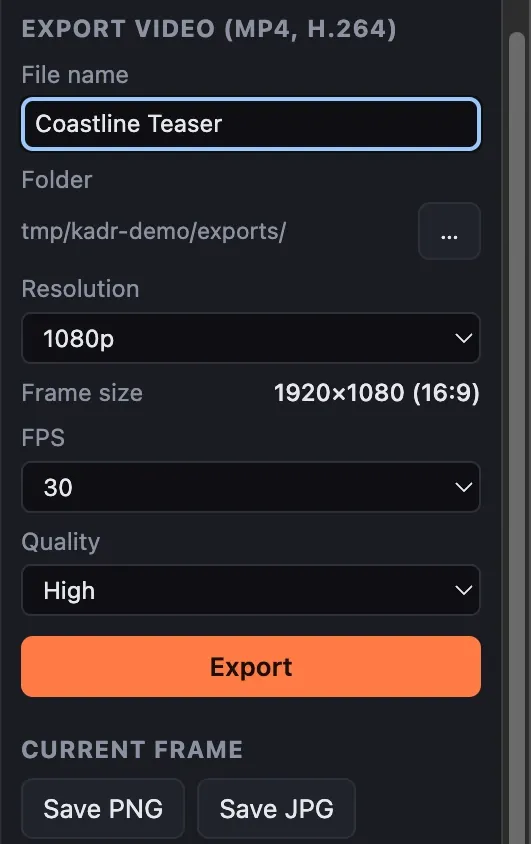
  • MP4 H.264 + AAC
  • 720p · 1080p · 4K
  • 24 / 25 / 30 / 50 / 60 fps
  • 3 quality levels
  • PNG / JPG frame export
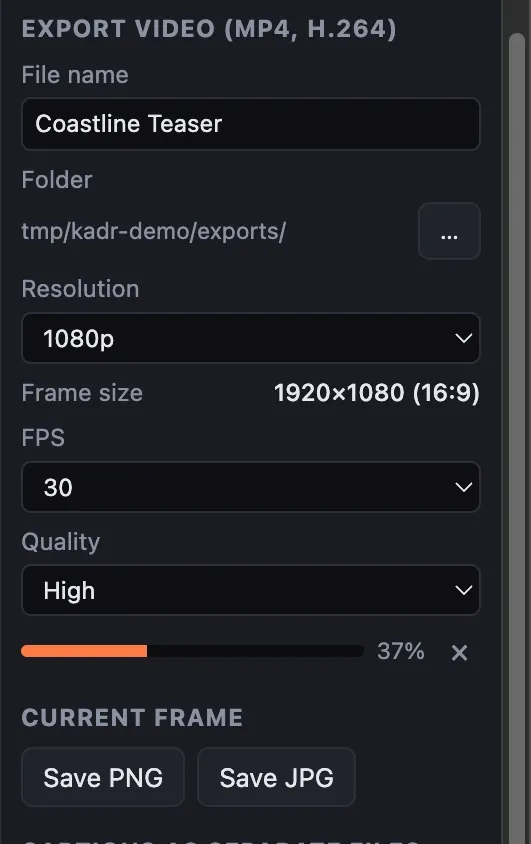
  • Cancel leaves no partial file
  1. Detail of the export settings screenshot. Export panel for MP4 H.264: file name, folder, 1080p, 30 fps, High quality, plus current-frame PNG / JPG and SRT / VTT caption export.
    01 Settings 1080p H.264
  2. Detail of the export in progress screenshot. Export in progress at 37 percent, with an inline progress bar and a job indicator in the top bar.
    02 Exporting 37%
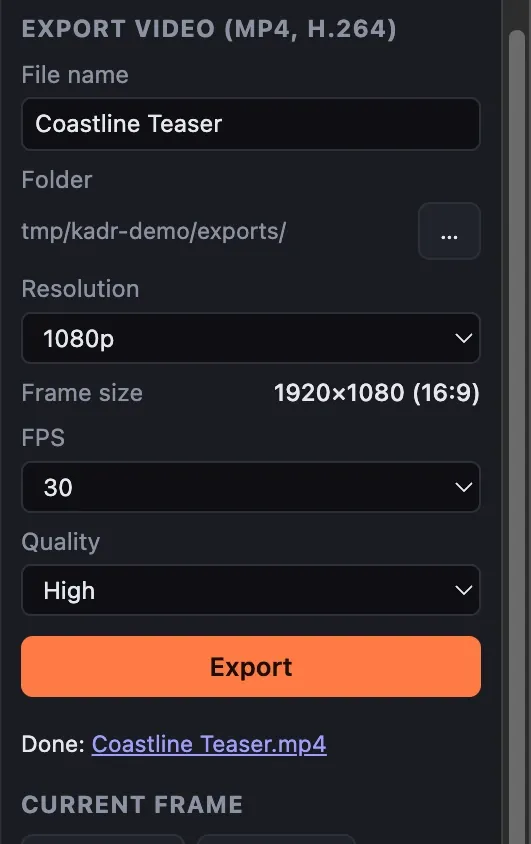
  3. Detail of the export finished screenshot. Export finished: a notice reads "Export finished in 3.8 s" and the panel links to the exported MP4.
    03 Done link to the file

FIG 09 Real app the 20 s demo timeline exported in 3.8 s

Your work is always saved. Twice.

Autosave within 1.5 seconds of every change, atomic writes and an automatic backup copy.

Autosave
1.5 s after a change, every 30 s, on quit
Atomic write
temp file → rename, plus a backup copy
Corrupt file
falls back to the backup
Move the folder
relative + absolute media paths
Missing media
relink in place
Sources
never modified; every AI result is a new file
Detail of the start screen screenshot. Kadr Studio start screen with a new-project form (name, 16:9 / 9:16 / 1:1 aspect ratio, folder), three recent projects and an interface language picker set to English.
FIG 09.2 START SCREEN REAL APP
Generic illustration

Offline isn’t a mode. It’s the architecture.

Network access is blocked at three layers, and every request is logged where the user can see it. The only traffic is a model download the user explicitly starts.

The LOCAL / OFFLINE dialog: all AI models run on this computer, no cloud AI APIs or accounts, no telemetry, media never leaves the computer, AI processes talk over local pipes with no network ports, the interface cannot reach the network; 0 blocked network requests and a network log reading "No network access so far."
  1. Six guarantees: local models, no cloud APIs, no telemetry…
  2. Blocked network requests: 0
  3. Network activity log: “No network access so far.”
FIG 10 LOCAL / OFFLINE DIALOG REAL APP

Illustrative · the enforcement layers, summarised

  1. [ok] renderer · content security policy denies every network connection
  2. [ok] main · outbound requests blocked and written to the visible log
  3. [ok] speech worker · offline mode · stdin/stdout · no open ports
  4. [ok] vision worker · offline mode · stdin/stdout · no open ports
  5. [ok] e2e test · import → edit → transcribe → voice → subtitle → export, network denied by the OS kernel
Network requests during the full run0

Illustrative summary: the interface, the main process and both AI workers are offline, the full workflow runs, and the network request count stays at zero.

Verified end to endA test runs the whole workflow with networking denied at the OS kernel level. The dialog on the left is what the app reported after generating the images, video, voiceover and subtitles used on this page.

Why now: the machine on the desk caught up.

Uploading footage and buying credits made sense when local models were weak. That is no longer true.

  1. Local models crossed the quality line

    Whisper-class speech recognition, open multilingual text-to-speech (Chatterbox, MIT) and open image and video models now run on consumer hardware.

  2. Consumer hardware caught up

    Every Mac sold since 2020 has Apple Silicon with unified memory, a GPU and a Neural Engine, and AI PCs ship with NPUs on Windows. On-device inference is a mass-market capability, not a lab demo.

  3. Cloud AI costs are passed to creators

    Credit systems and rising subscriptions make “AI included, offline” a clear value proposition — and a local product carries no per-use inference cost.

  4. Privacy and AI-rights pressure is rising

    Companies, agencies and public institutions restrict uploading media to third-party AI services.

A large market, a narrow first wedge.

Start with Mac creators who need captions, silence cuts and voiceover most; widen to professionals who cannot upload.

  • Video editing software, 2026

    ≈ $3.75 B

    Growing to ≈ $4.99 B by 2031

    Source: Mordor Intelligence · third-party estimate

  • Creator economy by 2027

    ≈ $480 B

    ~50 M creators worldwide

    Source: Goldman Sachs, 2023 · third-party estimate

Market figures are third-party estimates. Kadr Studio has no market traction yet.

Beachhead
Mac-based solo creators and small studios publishing talking-head, tutorial, podcast-video and short-form content — the users who need captions, silence cuts and voiceover most.
Expansion
Privacy-bound professionals (agencies, journalists, education, corporate comms, legal and medical), then Windows AI PCs.

Who it is for

  1. Solo creators on Mac. YouTube, Shorts, Reels, TikTok, podcasts and courses: captions, silence removal and voiceover without subscriptions or uploads.
  2. Privacy-bound professionals. Agencies under NDA, journalists, educators, corporate and internal communications.
  3. Offline and low-bandwidth users. Travel, field production, and regions with slow or metered internet.

Local-first by design, not a cloud editor with an offline mode.

Where the AI runs decides what a creator has to give up: footage, an account, or a credit balance.

How Kadr Studio compares with other video editors and AI tools
ProductAI runsAccount / uploadPricing modelEditor depth
CapCut desktopCloudRequired for AISubscription + creditsConsumer editor
DescriptCloudRequiredSubscriptionTranscript-first editor
Premiere Pro / Final Cut Pro / DaVinci ResolveMix; growing on-device featuresVariesSubscription or one-timeProfessional editor
Single-purpose AI web toolsCloudRequiredCreditsNone
Kadr StudioOn-deviceNonePlanned: free core + Pro licenceMultitrack editor + AI suite

Honest note: incumbents are adding on-device features, and Kadr Studio is early and smaller in features. The bet is a product that is local-first by design across the whole AI suite, not a cloud product with a few offline features.

  1. The whole AI suite is local

    Speech-to-text, voiceover, auto-editing, background removal and generation. No credits, no uploads, no account.

  2. Verifiable privacy

    An in-app network log, and an automated test that runs the full workflow with networking blocked at the OS level.

  3. Pluggable models

    Every AI feature sits behind a typed provider interface, so a better open model can replace an old one without UI changes.

  4. Zero marginal inference cost

    Compute runs on the user’s hardware, so gross margin does not shrink with usage.

  5. Licence-clean

    Every model and native component was audited for commercial use; non-commercial models were deliberately excluded.

Built like a product, not a prototype.

A sandboxed Electron shell, a pure TypeScript editing core, an LGPL FFmpeg build and out-of-process AI workers — each layer replaceable.

Architecture · top to bottom
  1. L1InterfaceReact + Zustand · canvas compositor · Web Audio · sandboxed, CSP-locked
  2. L2Desktop shellElectron main process · IPC · job system with lanes, progress, cancel
  3. L3Editing corePure TypeScript: project model, timeline ops, undo, frame model, export graph
  4. L4Media engineCustom LGPL FFmpeg build · VideoToolbox encode/decode · GPU HDR tone-mapping
  5. L5AI workerswhisper.cpp on Metal · Python 3.12: PyTorch MPS, ONNX Runtime + Core ML, OpenCV
  6. L6Platform layermacOS (Apple Silicon) verified · Windows layer written, not yet run on Windows

Will it run? Requirements and facts

Hardware
Apple Silicon (M1–M4). Intel Macs not supported.
OS
macOS 13 or later
Memory
8 GB for editing, transcription, voiceover · 16 GB for video generation
Disk
~3 GB app + optional models (listed 0.2–3.6 GB each, ≈ 8.5 GB for every model on this page; ≈ 15 GB on disk once installed on the test Mac)
Bundle
.app ≈ 2.9 GB · .dmg ≈ 1.4 GB
Launch
1–2 s (first launch 15–30 s for macOS verification)
Import
6 video containers · 7 audio formats · 8 image formats incl. HEIC, animated GIF
Export
MP4 H.264 + AAC · PNG / JPG frames
Signing
Ad-hoc signed · not notarized
Localization
English, Russian · typed dictionaries: a new language is mainly a new dictionary file
Codebase
Compact and readable: ≈ 8.7k lines of app code (≈ 7.5k TypeScript incl. ≈ 1.35k lines of EN/RU dictionaries, ≈ 1.2k Python) plus build scripts
Running costs
None built in: no servers, cloud AI APIs or accounts
  • Heavy work out of process

    FFmpeg, whisper.cpp and Python workers run as child processes. The UI stays at 60 fps during export, proxies and AI jobs.

  • Provider interfaces

    Nine typed provider interfaces. Replacing a model means replacing a provider; preview and export share one frame model.

  • Pure editing decisions

    Auto Cut, highlights, reframing and silence cuts are unit-tested functions that propose a change.

  • Self-contained runtime

    A bundled, relocatable Python 3.12 with two isolated AI environments. The user installs nothing.

Tested end to end. Measured, not estimated.

The benchmarks below come from recorded runs on an Apple M4 with 16 GB RAM (04.10.2026). Per-feature AI timings elsewhere on the page are stated measurements on the same machine.

  • Export · 3:06 timeline → 1080p

    28.6s

    6.5× realtime · 99 clips · 4 tracks

    bar = render time vs. timeline length · Recorded run 04.10.2026

  • UI during playback, export, proxies

    60fps

    p95 frame time 18 ms

    bar = 60 fps target · Recorded run 04.10.2026

  • Split on a 99-clip project

    13ms

    13–15 ms measured

    bar = one frame at 60 fps (16.7 ms) · Recorded run 04.10.2026

  • Memory, all processes

    <900MB

    845 MB source · 889 MB installed app

    bar = share of 16 GB · Recorded run 04.10.2026

  • Automated tests

    63

    48 unit/integration · 7 worker · 8 e2e

    run 06.10.2026 · longest model test run on its own · Recorded run 04.10.2026

The test run

  • 41 unit + integration tests · many run real FFmpeg, Whisper and TTS
  • 7 AI-worker protocol tests · speech and vision workers
  • 6 end-to-end UI scenarios · drive the real Electron UI
  • acceptance flow
  • full offline run (kernel-level network deny)
  • AI editing
  • model management
  • error handling
  • load test

All green on 04.10.2026 — from source and against the installed app with every development dependency hidden.

19 issues found and fixed during verification and packaging (11 in QA, 8 in packaging).

Feature status, item by item

Done · 16 items, each covered by a test or a verified run

  • Multitrack timeline: trim, split, ripple, snapping
  • Transforms, picture-in-picture, reverse, freeze
  • Transitions
  • Text titles + presets
  • Subtitles + SRT / VTT / TXT
  • Speech-to-text
  • Voiceover
  • Silence detection + removal
  • Background removal
  • Image generation
  • Proxy workflow + hardware export
  • Projects: autosave, backup, relink
  • Model Manager + licence data
  • Offline enforcement + network log
  • Packaged .app + .dmg
  • Interface localization (EN/RU)
Partial features and roadmap items, with notes
Partial + roadmapStatusNote
Scene detection + highlightsPartialCut-mapping defect (quick fix); highlights are markers
Auto Cut proposalsPartialSilence rules; scene rules wait on scene fix
Auto ReframePartialBeta: one framing per clip
Audio clean-upPartialDenoise is DSP, not neural
Colour + speedPartialBasic: no curves/LUTs, constant speed
Video generationPartialExperimental: 512×288, 2–3 s, 16 GB
HDR sourcesPartialTone-mapped to SDR, macOS
Voice cloningPartialEngine only, no UI
WindowsPartialPlatform layer prepared, not yet run on Windows
Keyframes + animationsRoadmapUnlocks continuous reframe
Word-level captions + transcript editingRoadmapWhisper segments exist
Masks, chroma key, stabilizationRoadmapOpportunity

Business model: licences, not credits.

Compute runs on the user’s own hardware, so there is no inference bill to pass on — and none to absorb.

Planned · not live · no revenue yet

  1. Free core editor

    Free for distribution, with Kadr Pro as a paid licence (one-time or annual) that unlocks advanced AI tools and model packs. Price points will be validated in the beta.

  2. Team and studio licences

    For agencies and organisations that need on-device processing: volume licensing and offline deployment.

  3. No per-user inference cost

    Revenue is mostly gross margin; the main costs are R&D and distribution.

Comparable anchors: Final Cut Pro and DaVinci Resolve Studio sell one-time licences; CapCut and Descript sell subscriptions.

Planned channels

  • Creator communities
  • YouTube tutorials
  • Product Hunt
  • Mac App Store / direct download
  • Search: “offline AI captions”, “private video editor”

Built and tested. Not yet launched.

Where the product stands today, and what comes next. The roadmap is a plan, not a promise.

Status today

  • DoneWorking MVP. Packaged, installable macOS app (v0.1.0) with the feature set on this page, built and tested by the founder.
  • DonePublic demo. A real screen recording of the installed app, on this page.
  • Partial · OpenBefore public beta. Apple Developer ID signing and notarization, and the scene-detection fix. Windows comes later (6–12 months).
  • None yetTraction. No users, customers, revenue, partnerships or outside investment yet. The product has not been released to the public.

Roadmap

  1. 0–3 months
    • Developer ID signing + notarization → public macOS beta
    • Scene-detection fix
    • Word-level captions
    • Onboarding
    • First 100 beta users + feedback loop
    • Pricing experiments
  2. 3–6 months
    • Transcript-based editing + filler-word removal
    • Keyframes + continuous Auto Reframe
    • Neural denoise + voice isolation
    • Pro licence launch
  3. 6–12 months
    • Windows on AI PCs (NVIDIA / DirectML)
    • Subtitle translation + local dubbing
    • Larger local video models on high-memory machines
    • Team / studio licences
  4. 12+ months
    • Agentic “edit for me” workflow over local models
    • Third-party plugins and models
    • Optional opt-in sync

The default private AI editor for creators.

Kadr Studio started as a test of how much of a modern AI video workflow can run fully offline on an ordinary Mac. The answer turned out to be most of it: captions, voiceover, auto-editing, background removal and generation, inside a real multitrack editor. Next: a full local AI video platform, where an agentic “edit for me” workflow runs over models on the creator’s own machine.

The team.

Built by a solo technical founder.

Designed and built end to end by the founder: the editor, the media pipeline, the AI-worker runtime, the packaging and the test suites.

Solo founder today. Funding would hire 1–2 engineers.

Questions an investor asks.

Straight answers, including the parts that are not finished.

  1. They will add some of it. But their businesses are built on cloud services, accounts and credits, and making the whole AI suite local cuts against those revenue models. Kadr Studio is local-first by design.

  2. By selling licences (Pro, Team) with no per-user inference cost, which gives software-like margins. Pricing is unvalidated today and will be tested during the beta.

  3. For speech-to-text (Whisper large-v3) and voiceover (Chatterbox), yes: these are state-of-the-art open models. Image generation is solid. Local video generation is still experimental on 16 GB machines, and we say so. The provider architecture lets the product adopt better models as they appear.

  4. The platform layer is written but has not been run yet. Windows is on the roadmap at 6–12 months, targeting AI PCs.

  5. None yet. The product is built and tested but not publicly released. The first milestone after funding is a signed public beta.

  6. A solo founder today. Funding would hire 1–2 engineers.

  7. Every model and native component was audited, and non-commercial models are excluded. The OpenRAIL use restrictions for Stable Diffusion 1.5 and AnimateDiff will be passed to users in the EULA. FFmpeg is built without GPL or nonfree components.

  8. No. There are no cloud AI APIs, accounts or telemetry. The network is used only for user-initiated model downloads, which are logged in the app. After models are installed the whole workflow runs offline, verified by an automated test with networking blocked at the OS level.

  9. It is ad-hoc signed, not notarized: there is no Apple Developer ID yet. Signing and notarization come first on the roadmap, before the public beta.

Kadr Studio app icon

Edit video. Keep it yours.

A working, packaged macOS video editor whose AI runs entirely on the creator’s computer — now heading for a public beta.

  • Working MVP
  • AI on-device
  • Tested offline
  • Pre-launch

To request the deck, reply through the channel this page was shared in.